
Racing × Physiology
The human performance layer for racing.
Telemetry shows what happened. Physiology shows why.

ApexFlow combines heart rate and HRV data from a chest strap sensor with your racing telemetry, letting you explore how your internal state relates to what happens on track. Modern sim racing gives you every data stream about the car – speed, throttle, brake, G-forces. ApexFlow adds the missing one: what's happening inside the driver.
It's an exploration tool, not a coaching system (at least not yet) – a way to see patterns in your own body. Where does your heart rate spike, and why? What does defending or attacking do to your physiology? How calm do you stay during race starts? ApexFlow is in public beta and currently supports iRacing, with real-world telemetry support in development.
How It Works
- 01Wear a Bluetooth heart rate strap that sends RR intervals – the Polar H10 is the recommended choice – and sign in with a free Yudemon account.
- 02Record every heartbeat while you drive: either with the Yudemon HRV app on your phone (nothing to install on your sim PC), or with the ApexFlow desktop app on Windows, which records and uploads in one click.
- 03Get the telemetry to ApexFlow. iRacing writes a .ibt file for every session; the desktop app finds and uploads them for you, and on the phone route you drop them on the upload page afterwards.
- 04ApexFlow aligns your physiology with speed, throttle, brake, G-forces and the cars around you by track position – your session is ready in the dashboard within minutes.
You need a heart rate strap, iRacing, a free Yudemon account, and either a phone with the Yudemon HRV app or a Windows PC with Bluetooth. From install to your first analyzed session takes under 30 minutes (most of it spent actually driving) – the Getting Started guide walks through the phone route and the desktop route step by step, with screenshots.
What You Can Explore
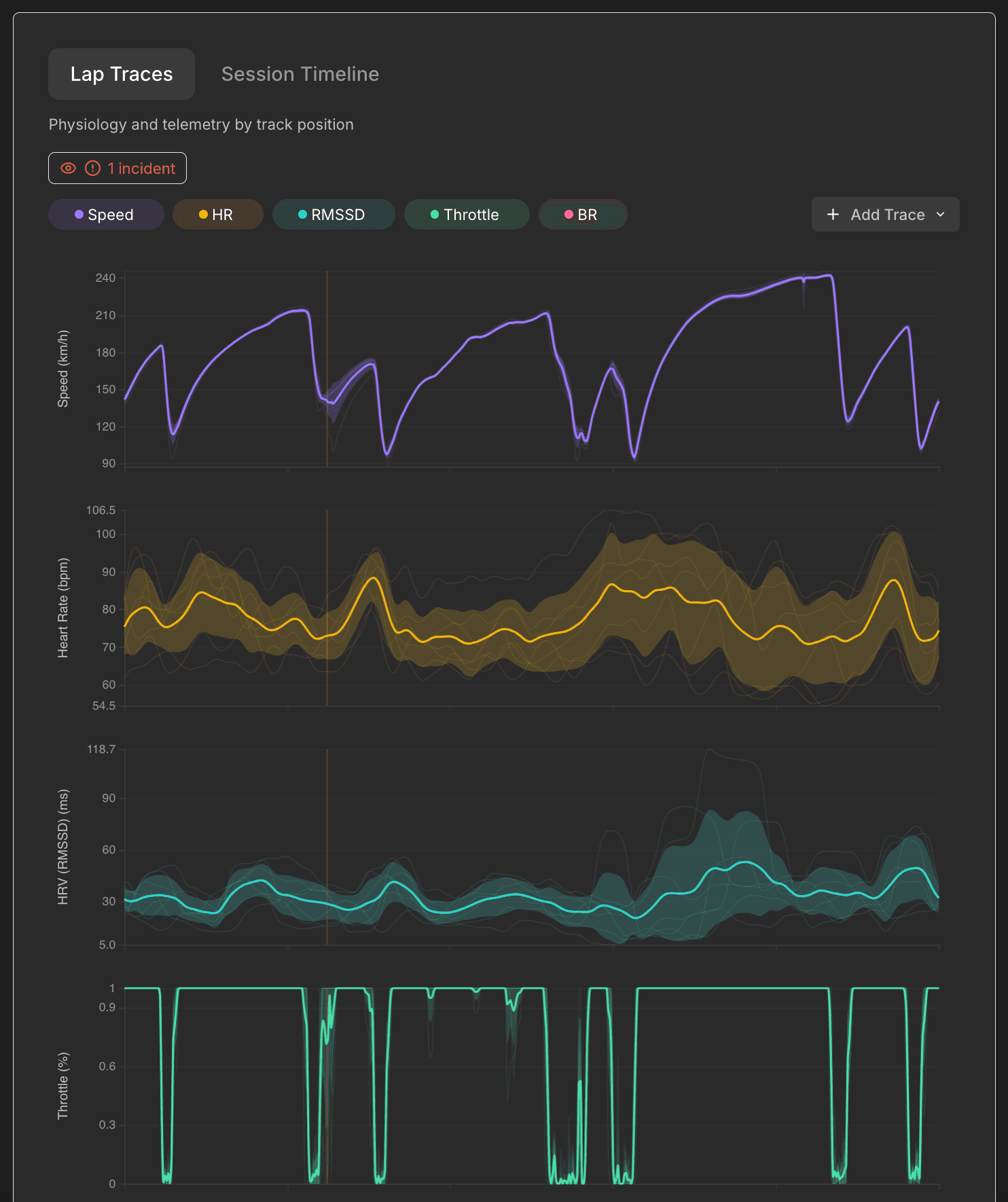
Lap traces – physiology and telemetry, corner by corner
Heart rate, HRV and other physiological metrics overlaid with speed, throttle, brake, and G-forces, all synchronized to track position. Every lap is a thin line, the average is bold – a view familiar from any telemetry tool, now with a physiological dimension. Incident markers show exactly where things went wrong and how your body responded.
Track heatmaps – see where stress lives on the circuit
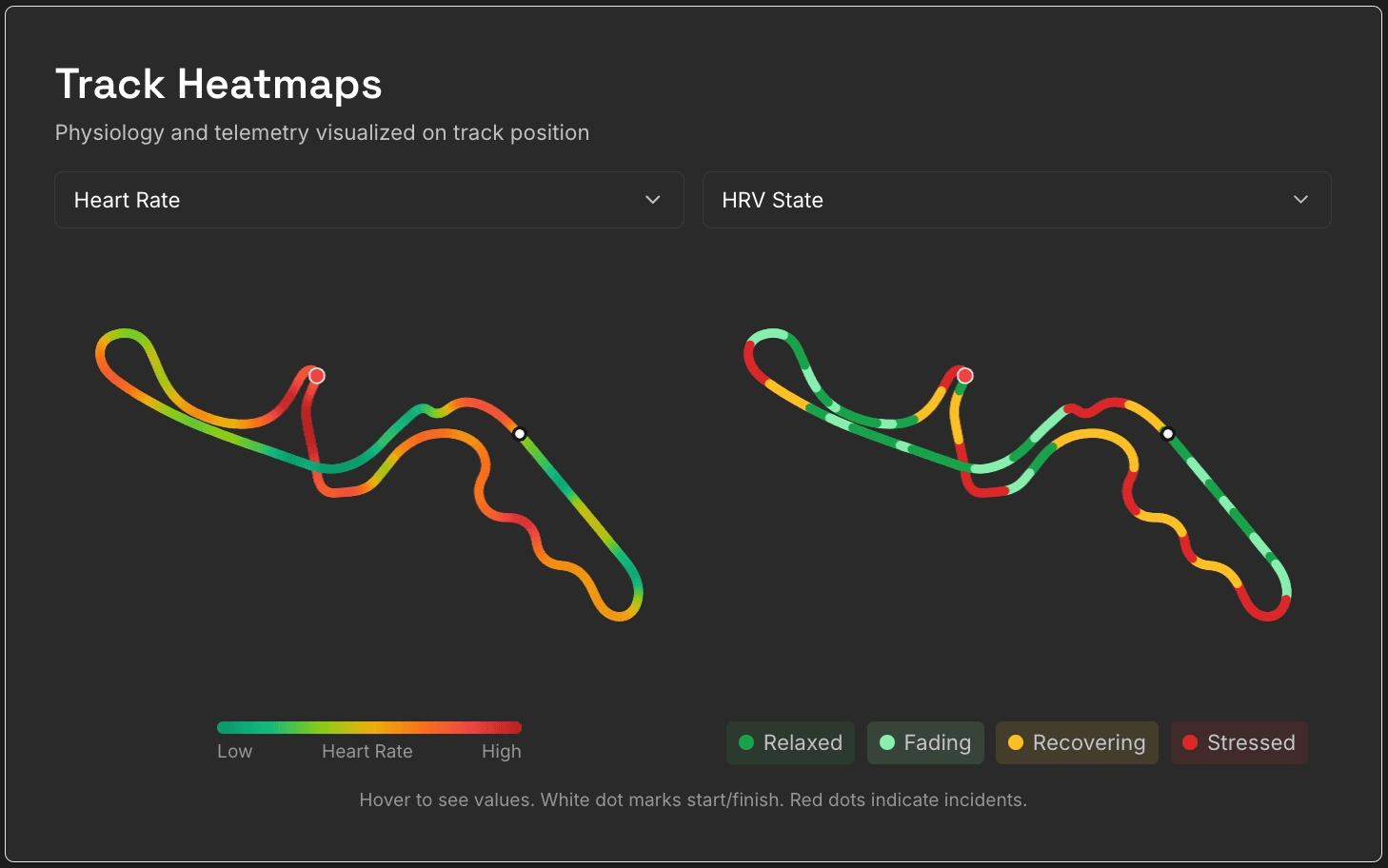
Any two metrics mapped side by side onto the actual circuit shape – heart rate next to HRV state, speed next to G-force. Which corners consistently elevate your heart rate becomes visible at a glance, and the pattern turns out to be remarkably stable from lap to lap: every circuit has a physiological signature of its own. It's the view at the top of this page.
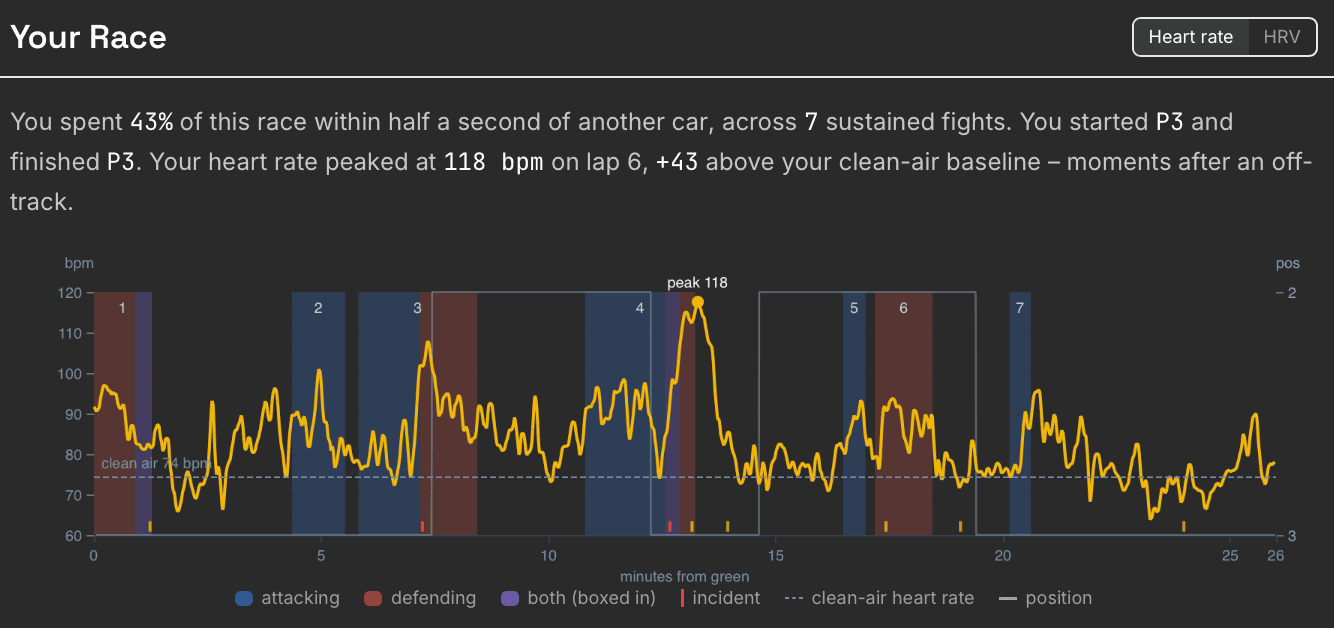
Your Race – the race as your body saw it
For every race, a timeline of your heart rate or HRV from the green flag to the finish, with every sustained fight marked – attacking, defending, or boxed in – alongside incidents, position changes and your clean-air baseline. It answers the question every racer has after a hard race: where exactly did it get to me? The summary line does the arithmetic for you – how much of the race you spent within half a second of another car, and where your heart rate peaked.
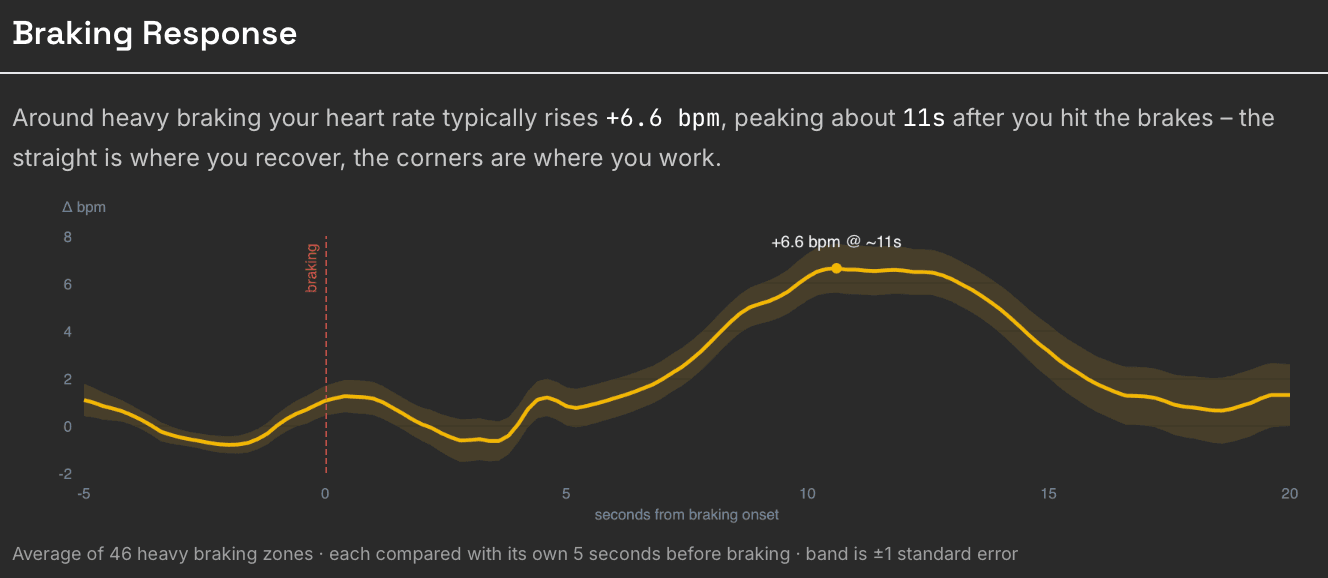
Braking response – how your body answers the corners
Every heavy braking zone in a session, lined up at the moment you hit the brakes and averaged: how much your heart rate rises, how long after braking it peaks, and how quickly it settles again. The straight is where you recover; the corners are where you work. For solo sessions, ApexFlow also flags the laps where you were genuinely pushing – the ones where an elevated heart rate came with faster times.
Insights – patterns across sessions, cars, tracks, and under pressure
Aggregated analysis across your whole racing history: how your physiology differs between practice, qualifying, and race sessions, between cars, between tracks, and over time. Do races tax you more than practice? With enough races, Physiology Under Pressure adds the season-wide picture: what running close to other cars does to your heart rate and HRV, how long fights cost you, and how your body handles the start – mine spikes by nearly 30 bpm at every green flag.
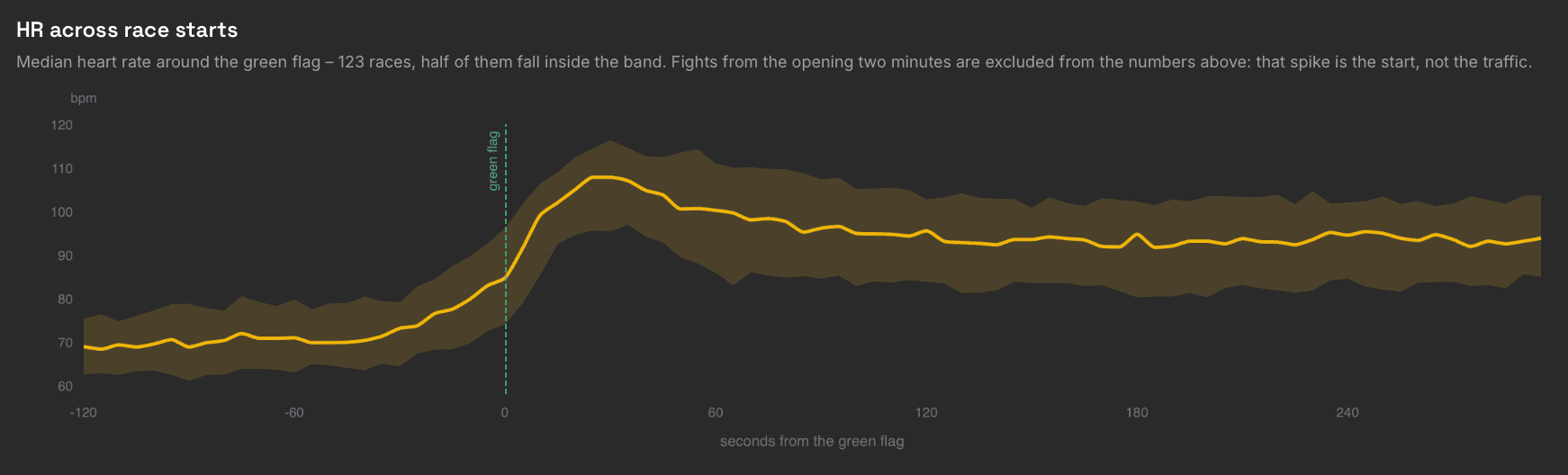
For the full tour of the dashboard – sessions, the session timeline, lap selector and more – read the ApexFlow launch deep-dive.
Frequently Asked Questions
- Which sims does ApexFlow support?
- ApexFlow currently supports iRacing – it reads the .ibt telemetry files iRacing writes automatically, so no in-game setup is needed. Support for real-world telemetry formats like AiM and MoTeC is in development.
- Which heart rate monitors work with ApexFlow?
- Any Bluetooth heart rate sensor that transmits RR intervals (the exact time between heartbeats, needed for HRV analysis). The Polar H10 chest strap is the recommended option. Most wrist-based watches do not transmit RR intervals over Bluetooth, so a chest strap is the safe choice.
- What do I need to run it?
- A heart rate strap that sends RR intervals, iRacing, a free Yudemon account, and one of two ways to record: the Yudemon HRV app on your iPhone or Android phone, or the ApexFlow desktop app on a Windows PC with Bluetooth. The analysis dashboard runs in any browser.
- Do I have to install anything on my PC?
- No. Record your heartbeats with the Yudemon HRV app on your phone, then drop the iRacing telemetry files on the upload page afterwards – ApexFlow matches them to your recording automatically. The desktop app is the more convenient option once installed, since it records and uploads in one click, but it is not code-signed yet: Windows shows a warning during install and you have to take my word that it is safe. The Getting Started guide walks through both routes with screenshots.
- Does ApexFlow show my heart rate live while driving?
- Only while recording – the phone app and the desktop app both show your live heart rate, but there is no overlay inside the sim, and that is deliberate. ApexFlow is built for what happens after the session: your full physiology synchronized with telemetry, lap by lap and corner by corner, so you can study patterns rather than glance at a number mid-race.
- How is this different from telemetry tools?
- Tools like Track Titan are awesome. They analyze the car – lines, braking points, lap time deltas, and driving mistakes. ApexFlow analyzes the driver: what the start does to you, what a car in your mirrors costs you, how your body answers heavy braking, and where on the circuit your heart rate climbs every single lap. The two are complementary; ApexFlow adds the physiological layer telemetry tools do not see.
- Will ApexFlow make me a faster driver?
- Not by itself – and it does not promise to (at least not yet). ApexFlow is an exploration and data analysis tool: it shows you what happens inside your body while you drive, which no telemetry tool can. Turning that into actionable guidance is where the roadmap is headed. A full season of my own data has at least sharpened the questions: the other cars and the race start did far more to my heart rate than the driving itself. Whether that can be trained, with a breathing protocol before the start for example, is exactly the kind of experiment ApexFlow makes possible.
- What can heart rate and HRV actually tell me about my driving?
- Heart rate shows how hard your nervous system is working; HRV (heart rate variability) reflects the balance between stress and recovery from moment to moment. Synchronized with telemetry, they show which corners reliably raise your heart rate, how the start hits you, what running within a second of another car does to you, how you respond after an off-track, and whether races tax you more than practice – patterns you can feel but not see in car telemetry.
- Is ApexFlow free?
- Yes – the free tier includes full session analytics for your most recent event. ApexFlow Pro ($9.99/month or $79.99/year) unlocks your complete session history and cross-session insights, and includes all Yudemon Pro features in the HRV biofeedback app.
- Can I use ApexFlow for real-world racing or track days?
- Not yet, but real-world telemetry support (AiM, MoTeC and similar formats) is in active development. If you race or do track days and want physiology analysis on top of your data logger, get in touch – it directly shapes what gets built first.
Start Exploring
ApexFlow is free to try – if you have iRacing and a heart rate strap, you can be looking at your own racing physiology in under 30 minutes, without installing anything on your PC. No promises of instant lap time: today it's a new lens on the driver behind the wheel, and what it becomes next will be shaped by what the data – and its users – reveal.