
iOS · Android
Yudemon HRV Biofeedback App
Most wellbeing apps optimize for one thing: calm. But in everyday life we can't – and shouldn't aspire to – eliminate all stress. What most of us actually lack is adaptability: the capacity to switch on when it counts and switch off when the challenge is over, instead of staying stuck in the middle – tired but wired.
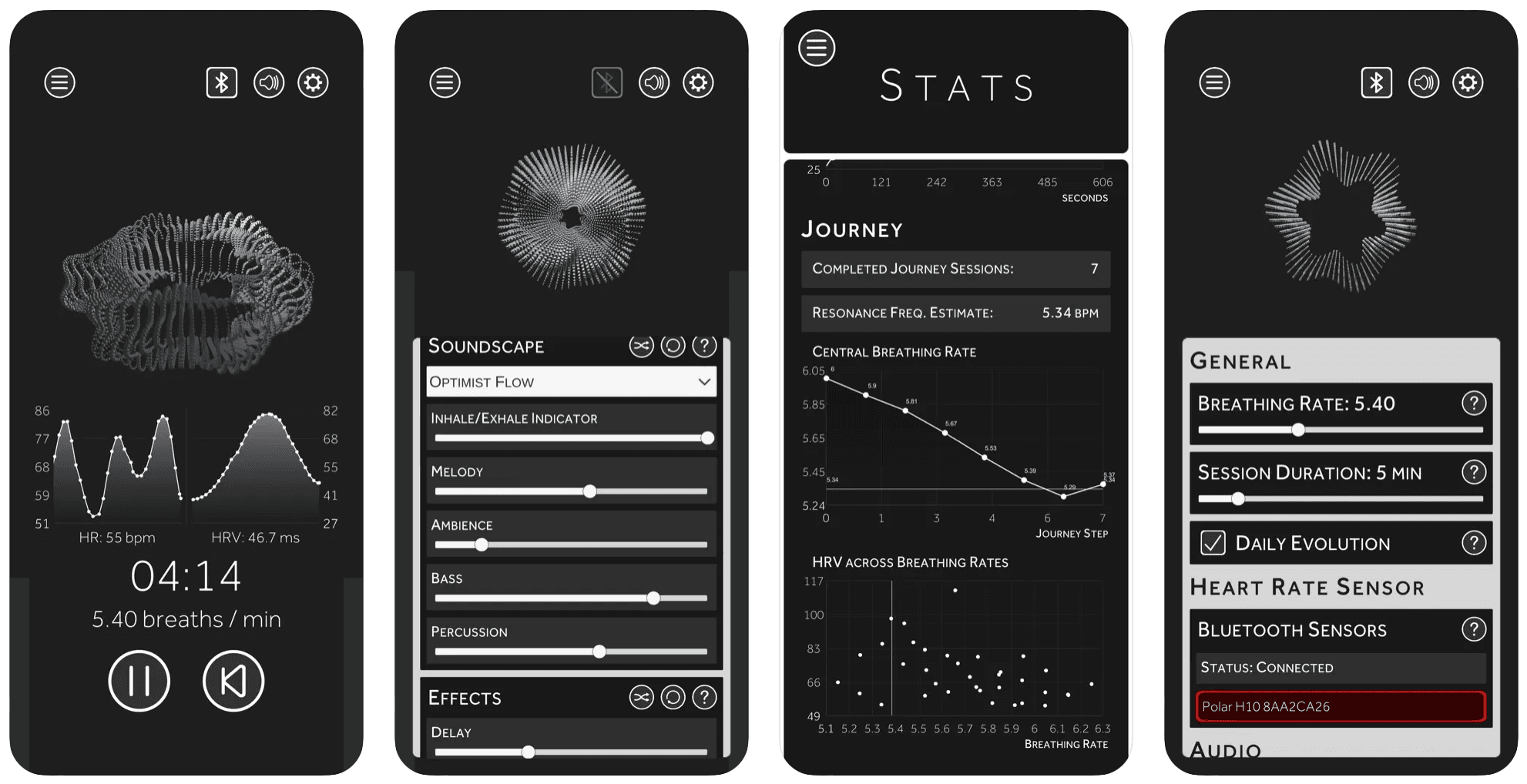
Yudemon trains exactly that. Resonance breathing and HRV biofeedback teach your body to move smoothly between excited and relaxed states, building stress resilience rather than just inducing relaxation. The app pairs the practice with soundscapes and visuals composed specifically for it – experiences that respond in real time to your breath and your heartbeat.


How Resonance Breathing Works
A healthy heart does not beat like a metronome – it constantly adapts, speeding up on the inhale and slowing down on the exhale. At one particular breathing rate, usually around 6 breaths per minute, this response becomes maximal: like pushing a child on a swing at exactly the right moment, each breath amplifies the heart's natural oscillation. That rate is your resonance frequency, and breathing at it is the most reliable way to raise your HRV and train your autonomic nervous system.
The app guides you with visuals, sound, and haptics at any rate from 2 to 10 breaths per minute, with adjustable inhale/exhale ratio and optional holds for box breathing. The sonic and haptic cues mean you can practice with your eyes closed. For how to do it and what the research shows, read the resonance breathing guide; for the science behind the breath–heart connection, read How the Breath Controls the Heart.
Journey Mode – Find Your Exact Resonance Frequency
Everyone's resonance frequency is different – anywhere from about 5 to 7 breaths per minute – and precision pays: in my own measurements, being just 0.2 breaths per minute off cost more than 10% of the HRV response. Yet nearly every tool estimates it the same way, with a single six-minute scan in coarse half-breath steps. One noisy reading, and you train at the wrong rate for good.
Journey Mode is a different, novel method. Each 10-minute session tests a small range of rates in randomized order and measures your body's actual response across multiple HRV metrics. Session by session the estimate refines, converging on your true resonance frequency with a confidence no single scan can offer. After five to ten sessions you'll have a solid estimate, and the practice itself is the measurement: every Journey session is a full resonance breathing session too.
I built this method to answer the question for myself, then validated it against 8 hours of controlled self-measurement – Journey Mode converged to within a few hundredths of the value the full study found. And it's since been successfully used by many others. The method is described in detail in A Novel Way to Establish Your Optimal Breathing Rate.
Foundations – A Guided Program for the Practice
Journey finds your rate. Foundations covers everything around it: eighteen sessions in six short phases, one new step a day, each an ordinary breathing session with one thing to focus on – breathing light rather than deep, reading what your heart rate is doing, making the practice a fixed part of your day, and using it in the moments before something matters. Every step comes with an optional science note if you're curious about the research behind it.
It works with or without a sensor, and with a strap you can run any step as a Journey session, so your rate estimate sharpens while you learn the practice. The first phase is free; Pro unlocks the rest. Read the launch post, or start with the resonance breathing guide for how to do it and what the research shows.
Soundscapes Composed for the Practice
To my knowledge, Yudemon was the first tool with music specifically composed for resonance breathing – not spa ambience with a timer on top. Rising melodies mark the inhale, falling ones the exhale, and the soundscape itself breathes with you: loudness and filter sweeps follow your breathing cycle, like the music slowly diving underwater and surfacing again in sync with your breath.
In a 10-session self-study (biased, as I'm the first to admit – but measured), practicing with the full soundscape raised my mean HRV by over 20% compared to breathing in silence. Yudemon offers many several different soundscapes, each built from five independently mixable tracks, spanning calm textures to a drum & bass piece – because stimulating practice is (at least) equally valid practice as calm one. The study and the soundscapes themselves are both public. More soundscapes are constantly being added.
Visuals & Your Heartwork
Four visualization styles – from a minimal breathing circle to twelve geometric forms that pulse with your live heartbeat, to a thousand-particle swarm – in eight color themes. By default the app evolves its look and sound daily, so no two sessions feel the same.
And as you progress through your Journey, the app generates your Heartwork: a piece of generative art drawn from your own heart's data, unique to you, growing in intricacy as your practice deepens – and slowly fading if you stop, because regular practice is what actually produces results.
The Web Dashboard – Understand Your Practice
The app is where you practice; the web dashboard is where you understand your practice. Sync your sessions and every breath becomes explorable: streaks and weekly trends at a glance, a practice heatmap in the style of GitHub's contribution graph, and full analytics across four lenses – individual sessions with beat-by-beat detail, long-term trends, insights that connect your practice to outcomes, and your Journey's convergence over time.
Instead of seeing isolated sessions, you see your journey over time. Instead of guessing what works, you see the data. The dashboard is included with a free account; Pro unlocks the deeper trend charts and physiological breakdowns.
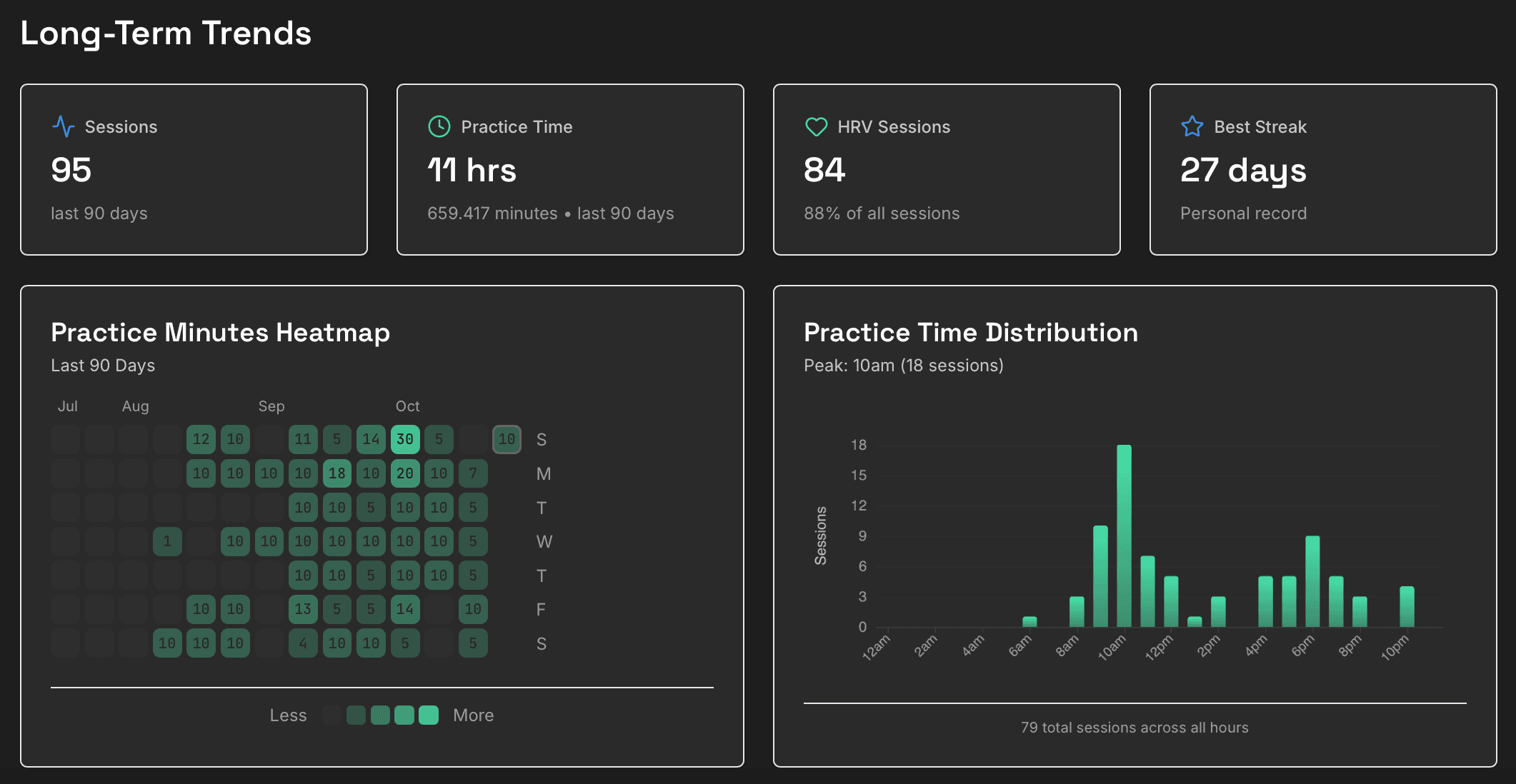
The full tour lives in Deep Dive Into Your HRV Practice.
Your Data, Your Choice
Yudemon is local-first: everything lives on your device by default, and the app is fully usable without an account. An optional account adds cross-device sync (with granular toggles for what syncs), the web dashboard, and a full export of your raw data – all sessions, all statistics, all raw HRV data – because your data is yours, and you can take it with you at any time. If you love the fully local experience, nothing changes for you – accounts are entirely optional. No ads, no advertising ID, no data selling.
Frequently Asked Questions
- Do I need a heart rate monitor to use Yudemon?
- No – the guided breathing sessions, visuals, soundscapes, and practice stats all work without any sensor. A heart rate monitor is what turns practice into biofeedback: it unlocks live heart rate and HRV during sessions, and it is required for Journey Mode, which measures your body’s actual response to find your resonance frequency.
- Which heart rate monitors work with Yudemon?
- Any sensor that speaks the standard Bluetooth Heart Rate protocol and transmits RR intervals (the exact time between heartbeats). In practice that means chest straps: about 7 in 10 Yudemon users practice with a Polar H10, and the Polar H9, Garmin HRM-Pro, Wahoo TICKR, Scosche Rhythm 24, and most generic Bluetooth straps work too. Chest straps read the heart’s electrical signal directly, which is what accurate HRV measurement needs.
- Does it work with Apple Watch, WHOOP, or Garmin watches?
- Mostly no, and it comes down to hardware: Apple Watch (currently) does not broadcast heartbeat data over Bluetooth, so it cannot connect. WHOOP bands can connect and some users practice with them, but optical wrist sensors are noticeably less accurate for beat-to-beat HRV than a chest strap. The Polar Verity Sense uses a custom protocol and does not work. For reliable biofeedback, a chest strap is the answer.
- My sensor is connected but the app shows no heart rate. What’s wrong?
- Almost always one of three things. First: only one app can receive data from your strap at a time – close other HRV apps and remove the strap from your phone’s system Bluetooth settings, then connect from inside Yudemon. Second: the Journey start button deliberately stays inactive until a live heart signal arrives – that’s a safeguard, not a bug. Third: a low sensor battery is the most common cause of dropouts and jagged readings.
- What is resonance frequency breathing?
- Everyone has a breathing rate – usually somewhere around 6 breaths per minute, individually anywhere from about 5 to 7 – at which their heart rate oscillations become maximal: the heart speeds up strongly on the inhale and slows down on the exhale. Breathing at exactly this personal rate is resonance breathing, and practicing it regularly is the core of HRV biofeedback training.
- How is Journey Mode different from how other apps find my breathing rate?
- Most tools run a single short scan – a few minutes stepping from 7.5 down to 5 breaths per minute in 0.5 steps – and pick the best value once. One noisy measurement can hand you the wrong number for good. Journey Mode instead refines its estimate across many 10-minute sessions, testing small ranges of rates in randomized order and combining multiple HRV metrics, converging on your resonance frequency with far higher precision. The margin matters: being just 0.2 breaths per minute off can cost over 10% of your HRV response.
- What is the Foundations program?
- Foundations is Yudemon’s guided program for building a resonance breathing practice: eighteen sessions in six phases, one new step a day. Each step is an ordinary breathing session with one thing to focus on – from breathing light rather than deep to using the practice before something demanding – plus an optional science note. It works with or without a heart rate monitor; with a strap, any step can run as a Journey session. The first phase is free, and Yudemon Pro unlocks the rest.
- Why is my HRV number different from my watch, ring, or other apps?
- Different tools measure different things: overnight averages vs. live readings, different metrics (RMSSD, SDNN, proprietary scores), different time windows, and different sensors. None of them are directly comparable, and that’s normal. What matters for training is consistency within one tool – Yudemon uses RMSSD computed live from RR intervals, the standard metric in HRV biofeedback research.
- Is my data private?
- Yes, by architecture rather than by promise: all your data lives on your device by default. Creating an account is optional – it enables cross-device sync and data export, with granular toggles for exactly what gets synced. You can export everything as JSON or delete your account and cloud data from inside the app. No ads, no advertising ID, no selling of data.
- Is the app free?
- The core experience is free: unlimited breathing sessions, sensor connection with live heart rate and HRV, four soundscapes, all the visual styles, practice stats and streaks, your first Journey sessions, and the first phase of the Foundations program. Yudemon Pro (a subscription, priced in your local store) unlocks the full Journey Mode, the full Foundations program, additional soundscapes, advanced stats and history graphs, and full customization.
- Is Yudemon available on iPhone and Android?
- Both – iOS 15 or later and Android 6.0 or later, with the same features on each platform. The one exception is Apple Health integration (mindful minutes), which is iOS-only. Your account syncs progress across devices, and the companion web dashboard offers deeper analysis of your practice.
- Can I use Yudemon with clients, athletes, or in research?
- Yes – therapists, coaches, and researchers use Yudemon, and the Coach platform lets practitioners view clients' sessions with explicit consent. If you're standardizing hardware for a group, the Polar H10 is the recommended choice. Get in touch to talk through your setup.
Start Practicing
Free to download on iOS and Android – all you need to start is five minutes. A heart rate strap can come later, and when it does, the real biofeedback begins.